Showing posts with label computers. Show all posts

Thursday, June 26, 2008

Why I Use Firefox

Every geek at some point or another has to defend hirself.

Sigh... here we go.

He begs off by saying he doesn't use Foxfire and doesn't know anything about it and that Foxfire represents only 6% of computer users anyway.

LOL
. Which 6%, I wonder? ;)

Well, us for example. :-)

Sounds like Jim is in a bad mood.

Well, he just doesn't understand why anyone would use Firefox [sic]. He has little patience with Firefox [sic] users.

Okay, Jim; this is for you.

It's no secret that savvy computer users run Firefox. The reasoning is simple... in order to use Firefox, you need to be confident enough to download and use a browser that wasn't the default when you first turned on your computer. This - and it blows my mind to say this - is still beyond most people. Think of grandma as a very typical IE user... that is *anyone* who isn't familiar with the tool that is a computer enough to configure it.

Of course, Jim is not like that.

Unsurprisingly, that same 6% of people Jim's talking about are also the leaders of technology, developers, college grads, etc. There are lots of sites which provide data to back this up... higher technology sites pull higher % Firefox users, more sophisticated sites pull higher % Firefox users.
Of course, 6% isn't a fair figure, here's the most recent I found:
http://www.e-janco.com/browser.htm
If you look, Firefox is 15%. Now then, below Firefox are older versions of the same open-source code. So the real figures are much higher. Jim is just way off base there.

Also, while just 15% of the people use the latest version of Firefox, every computer science graduate I know runs Firefox.

Now here's the biggest reason why I use Firefox, but bear with me for a moment... it's not complicated, but it is a complex reason!

What makes the Web possible is the language that all the different types of computers (running different types of browsers) use to communicate with each other. That language is called the Hyper-Text Transfer Protocol, or HTTP. By the way, that's the same HTTP as in http://prettygetter.tv! When you type that into a browser, you're telling your computer to connect to my computer. Connect how? By following the HTTP rules for conversation (computers are very strict when it comes to these things!)

So HTTP allows computers to share data- but what data? How can a computer running MacOS understand data written by a computer running WinXP?

That's the job of the Hyper-Text Markup Language, or HTML. The page you are viewing is composed in HTML. Every web page is composed (ultimately) in HTML. There is a standards body which determines what HTML can do; although they didn't create HTML, they are responsible for its growth. That group, founded by the creators of early web browsers, is called the World-Wide Web Consortium, or W3C for short.

Here's the rub with IE; it's the only browser on the market which does NOT follow W3C guidelines. All the other browsers do- Linux, Mac, whatever, you name it, they all render HTML the way W3C says they should.

Microsoft does not adhere to W3C guidelines, they modified and 'augmented' HTML to make it do all kinds of things that could only be done on computers running Windows. In doing so, they made it possible to write a wider range of more sophisticated web-based application, but at the same time, they created a larger mess (because HTML wasn't designed to do this!)

First, any page you write which uses these 'non-standard' features will ONLY work on IE. That's intentional, by the way, to keep market share. I find it despicable. Unfortunately, Len's page is like this... using code that only IE browsers on Windows machines can understand... and even then, only if they have the same codecs used to make the video.

I think you can see why this is bad in terms of putting information about there for all people to access. Better to put up video in a format and technique that allows all people to view it. I simply can't imagine why one would not choose to do this (unless they didn't know how).

Second, by giving these apps more power, Microsoft has made it easier to write spyware programs and viruses embedded into web pages which can infiltrate your computer.

Firefox users don't get virus, IE users do. Why? First, the things a virus needs to do can't be done with W3C HTML. Period. (To be fair, Microsoft has tried to address this by adding a whole mess of 'internet options' and 'zones' and whatever.)

Also, Firefox code is open-source, meaning the smartest, brightest people have looked on and worked with the code in order to make it stable, safe and secure... you know, people who do it for the love of it, just because it's the thing to do? IE has a team of programmers... maybe 30... Firefox code has been viewed by thousands and any bug or exploit cannot hide from so many eyes. (That itself is a major reason why there are so many open-source software advocates - the stability of mature open-source programs can't be matched.)

Third, any developer who wants to reach all users- W3C compliant or not- must now pepper their pages with code that runs on IE, and code that runs EVERYWHERE else. THIS is the reason why so many developers hate Bill Gates... perfectly standard code that runs the same everywhere won't run on IE cause they don't conform to W3C standards, or worse, each different version of IE conforms differently! What a needless nightmare!

I have been building sites which work the same on both IE and Netscape for over a decade now, and my secret is to follow the W3C guidelines exactly. I don't use proprietary features and I keep things simple, using my creativity to build full-featured sites that are also W3C compliant. Very few people can do this AND do it elegantly. That's how messed up things are.

So, as one who believes that if you put information about there, you have a responsibility to put it out there for all people freely, I am against IE because they do not follow global standards but instead pursue their own proprietary interests. This fragments the information world, makes your computer more vulnerable to attacks, and makes it harder for people to share information freely.

That is why I don't use IE. I also like that Firefox allows me to confirm or deny every cookie some random weirdo wants to set on my machine. You wouldn't believe the traceable information they can get about you if you don't do this!

Saturday, June 21, 2008

:: Best Error Message Yet ::


Got this error message while building a system for a client...

Parse error: syntax error, unexpected T_PAAMAYIM_NEKUDOTAYIM in /home/prettyge/public_html/clients/crazyd/admin.php on line 142

After you've been programming a while, you generally know what the error means... syntax errors are just silly, sometimes you forget a closing '}' ... but I'd never seen that one before.

Quelle excitement! I don't even know what a PAAMAYIM NEDUDOTAYIM is! I wonder what it would look like?!

Checking out line 142, the error was obvious but in a non-obvious way:

$HTML::Out("<option value='$u->user_id' $option>$u->nickname</option>";

Can you find it? Hint: it's a syntax error. Oh yeah, the first character '$' shouldn't be there.

Doh!

But seriously, that was the most exciting error I've seen in ages, partly because it looks okay if you view PHP code with HTML eyes, and partly because I learned that PAAMAYIM NEDUDOTAYIM means "double colon" (::) in Hebrew.

Monday, May 26, 2008

Why You Can Linger At Your Online Bank

While having dinner with the cast of Follies, (teehee) I met a nice young woman named Lee. Lee was a bit concerned (rightfully so) about her online privacy, especially when looking at her bank statements.

"I logon and logoff as fast as a I can," she said, "I don't want to take any chances with anyone seeing my details!"

Perhaps I missed an opportunity to enlighten the table, but my social faux paux early warning system prevented me from explaining why that statement was ... inaccurate. Perhaps not polite (or even very interesting) dinner conversation, but excellent blog fodder!

You see, Lee, when you get online, you would be right to think that anyone could 'see' what you're doing as you send information to/from your computer through the web. That is true, even if you are connected via a wireless encrypted network!

However, when you visit a bank, you no longer send information in a readable format across the web; it is encoded in a format which makes it unreadable to humans, and for the time being, any computer that isn't yours or the bank.

So, yes, in theory, someone could tell that you're sending data to/from a bank, but they would be unable to decode that data and make any sense of it.

Finally, the danger of your 'screen being read' comes not from how long you keep it up on your screen, but rather during the time the bits travels from the bank to your computer. It's like a real letter. If you send me a letter through the mail, who knows what eyes could read it in transit (unless you encode it!), but by the time it's in my hands, no one else could then read it.

So relax, sip a cup of coffee and enjoy how much interest you've earned... you're safe from prying eyes as long as there isn't anyone with binocculars over your shoulder! ;)

Thursday, March 27, 2008

Technology Fetish

Being Digital
That's what three Terabytes look like. A single character or number is typically stored using 8 bits, or just one byte. This sentence contains 42 bytes. One thousand bytes together is called a Kilobyte. Remember those 5 1/4" floppy disks? One of those held 512 Kilobytes. One thousand Kilobytes is one Megabyte. The bible is about 4.5 Megabytes, as is a decent quality 4-minute mp3. One thousand Megabytes - a billion bytes - is a Gigabyte. A CD is about 3/4 of a Gb while a DVD is nearly 5 Gb. One thousand Gigabytes make one Terabyte. Thus, one Terabyte is one trillion (1,000,000,000,000) bytes.

Three Terabytes is just enough to store everything significant I've ever seen or done digitally... for now. Of course, counting backup, that's six Terabytes. The big gray disks are 1 Tb each and together, they hold around 400 DVDs. The black disks are each 320 Gb. One contains all my personal data, one all my music, one all my non-DVD videos, and the fourth contains all my Websites.

Just for fun, one thousand Terabytes is a Petabyte, enough to store all research libraries in the United States! One thousand Petabytes is an Exabyte. A drive that big could hold all the printed material ever created by humans... and only be 20% full! One thousand Exabytes is one Zettabyte... that's one billion trillion bytes! Finally, one thousand Zettabytes is a Yottabyte, or one billion billion bytes. That's a yotta bytes! Did I just say that out loud?

To put that into perspective, there are approximately 3 billion genes in you, and you're make up of around 1,000 billion billion atoms. If we could miraculously somehow store everything about an atom in one Kilobyte of data, it would take 1,000 Yottabytes to store a human!

How many hard drives are that? Let me put it to you this way... if you stored all of this data on the Terabyte hard drives above, and you then stacked them end-to-end, it would take light 1,000 years to travel from the first to the last! (Light travels from the Sun to the Earth in 8 minutes, and it takes light 4 years to travel to the nearest star!)

Amazingly, if you would have done all that 10 years ago, it would have been 100 times longer! That's 1/3 the way to the center of the universe!

So, Scotty, beam me up... just not on a dialup modem! (That would take 11 trillion years! My clothes would be unimaginably out of fashion!)

Mobile Evolution
All my mobiles, first to current, from left to right. I loved my first cellphone... it was so tiny and so perfect for London. You could carry it everywhere and forget you had it (until it started vibrating!) It even had a color LCD. The middle one was my most powerful... four years ago and it's still more powerful than anything I can get around here. It was such a commanding cell phone, the one on the left came with free! Seriously, it was a $1,000 phone. Sigh... I miss having research funds. Returning to America, disgusted with the calling plans, I went simple, pay-as-you-go. For being a free phone, it was pretty cool. On the right is the current... so far, me likey, but I wish it came in pink! At least it's unlimited TV, radio, calling, texting, and surfing... finally, a sane calling plan!

Mobile Office
Everything you do from your desktop, you can do from the road! Here's how I merged my backgrounds in technology and Zen. Starting from the top and doing down the first column, we have
  • cables to connect anything to everything
  • tripod for video camera
  • batteries,
  • USB Bluetooth adapter
  • camera battery charger
  • DVD player power adapter
  • USB HDTV + remote control
Down the next column are all the personal hard drives. I don't travel with all my DVDs because technology hasn't made them small enough yet. (And Blue-ray makes the prospect bleaker still!)

The blue gadget is an HDTV video camera and going from left to right,
  • camera
  • mouse
  • web camera
  • bluetooth headphones (for wireless listening)
  • the mobile
  • mp3 player
  • SD adapters (so I can transfer data from any computer)
Above that is a projector, cables, laptop power adapter, and a universal adapter that charges all the other devices from a wall socket or a car lighter. Left of that is some extra laptop batteries, and a wireless hub (so I can create an encrypted network wherever I go). Under that is a DVD player and below that... speakers. Yes, I travel with a complete home entertainment system! Great for parties, too!

Just about everything I could think of doing on a computer, I could do with what you see. There's still some equipment not shown... a few wireless cameras (for use on the wireless network) and some toys that turn an ordinary whiteboard into a wireless whiteboard. If I were in an environment where I was giving or attending more talks, I'd bring that along too... it's pretty small and runs on batteries!

But that's it... and believe it or not, all that (plus a laptop!) fits into one carry-on briefcase with room for travel documents and magazines.

Phew! Anyone got a cigarette?

Tuesday, March 04, 2008

Busy Work (Resolution #4)

Four solid days of scanning, photographing, and copying media! Here's the tally so far:

All 328 DVDs are on disk! That's 1.8TB, if you're curious. Add to that around 78 VHS tapes (mostly of dance instruction), 18 Hi-8 tapes (mostly of dancing in ATL clubs), and a slew of cassettes. (+10GB)

This may sound funny coming from me, but I do write on paper. A lot. A whole filing cabinet's worth in just over two years, actually. Well, that cabinet is scanned too!

I've also scanned in every letter from every friend, pen-pal, and ex-g/bf! Every greeting card I've ever received too! Also have scanned diplomas, transcripts, award certificates, and photographed trophies, medals, and trinkets. (+3Gb)

I've been busy!

Basically everything I ever kept in my life. My tangible memories are reduced down to one box, with everything in it transcoded to digital form... just in case I never see it again.

Phew! But we're not done yet!!! There's still to go 13 years of academic notes and every book that has been valued enough to keep for this long. We'll tackle the notes this week, hopefully finishing by the end of next, and I'm calling in reinforcements from BSU for the books, but more on that later.

So I'm very close to having everything of importance I've ever saved or created on one disk that fits in a shirt pocket!!! Going through those memories is pretty emotional, (especially when one is not in the best of places) but it seems I was fortunate enough to save the things that mattered most from my youth. Bittersweet memories.

And I'm delighted and proud that I can take them all with me and travel lightly at the same time! :) So here's a twist on Zen... dissolving the ego while using technology to preserving it digitally, effectively reducing one's life to electrons. Hey, that's pretty compact!

Hopefully, this kind of thing will become common in the future allow us to better deal with death and the destruction of the self-identity, since it will be preserved exactly as one wants it to be.

For what more can one ask?

Saturday, March 01, 2008

Every Day Make Progress (Resolutions #4, 6 & 7)

In my efforts to simplify, I chanced upon a spare DVD drive when purging my technology. Whoo-hoo! As I type, DrEvil (my entertainment PC) is now digitizing two DVDs at a time. No matter how long it takes to do a task, you can't help but feel a great sense of achievement when you shorten by one-half the time required.

And if that feels great, imagine taking a task was going to take an infinitely long time and reducing it to a finite time. Yeah, that feels good too. I've started scanning! What was never going to be finished (cause I hadn't made any progress on it) is now started! Random Task (my printer/scanner/fax/etc) is busy scanning in my notes from high school. Yes... notes from high school. Mostly (typewritten!) reports and such. Also in this batch are all of my college essays (dot-matrix printouts from a Vax system that doesn't exist). I never had these documents in any lasting digital format (or lost the ones I did) so it feels good to scan them in. In fact, some of them were done on a Commodore 64! It will feel better to reduce this filing cabinet of papers down to a deck of cards.

Speaking of cards... making progress on that front too. I've started writing the program that will analyze all of my poker tournaments from this year. Problem is, I didn't have the tool written back in Jan, when I started recording them. I figured it was better to save them, even if it was in a format that I'd have to deal with later. Well... the tool I eventually used (I should have used mine from the start) creates Flash movies.

So, I've written a tool (in Flash) to view these movies and find what are my strengths, weaknesses, how I can win more chips and lose less. That means writing a Flash program to view/analyze flash recordings of my games, AND getting Flash to save JPEG images. Trivial for any real programming language, but in Flash, it requires (in the simplest case) running a Web server and communicating with a PHP script (which actually does the .jpg creation and saving.) Insane! Especially since I've nearly finished the real program written in Java ( should have used that from the start).

The insanity of Flash is also why I just quit my freelance job. (I got fired from my real job for being a transsexual, but this was a client I've freelanced for a few years now.) I just couldn't work they way they work. Which is to say, I couldn't continue to build high-quality kick-ass systems - on the fly - forever in the face of constantly changing requirements. And building them in Flash (for reasons discussed above) just made it worse. When I realized they couldn't build what they want using the technologies they insist on using, I tried to tell them, but they wouldn't listen to the to the only one with the degree in software engineering! LOL! Fine, but when I realized they didn't appreciate what work I was doing, I figured it was long past time to go. Darren, I made miracles for you; I hope you see it someday... so long, and thanks for all the fish!

Monday, February 18, 2008

Music ... Food for the Geek


I'm so excited to have just rediscovered a large library of music (250+ hours) that I have not heard for nearly 20 years! Not just any music, mind you, but music that deeply inspired my own compositional style!

Wanna hear for yourself? Okay, check out the following two links, but don't worry about the graphics or what they are, I'll explain that later... for now, just listen to the music.
Perhaps an explanation is in order? First some context on the music. Nearly 20 years ago, while in college, I was writing music for video games. This was a significant challenge for me because I was used to composing music using MIDI sequencers and synthesizers. In video games, the computer became the instrument.

Recall that this is before .mp3s and before the comparatively huge resources computers have now... back then, most computer programs were under 1.44Mb (they fit on a floppy disk) and most computers had, if you were lucky, 1/2 Mb of RAM available for everything... the operating system, the program, and the music. A typical mp3 is six times that large!

So, making music on a PC, or making a PC make music, was tricky business! When I started we only had four 'voices' where a voice could be a sampled recording. Again, there wasn't mp3 compression back then, so the samples had to be TINY (and recorded at awful quality) or you wouldn't have enough memory to play it. When I stopped (because grad school got too hard), we had 16-track editors, but again, you didn't have much memory to work with.

That first link above? Just four voices! The second one? Eight.

But what about the video? Have you ever heard of the PC Demo scene? The idea, back then, was to show off the processing power of the mighty 386. Again, this was waaay before today's quad and dual-core Pentiums. Your mobile phone is probably faster now. Amigas were doing it for a while, and they would have parties where groups of kids (programmers) would write these elaborate presentations filled with (then) mind-blowing graphics and animations ... you know ... things never before seen on a computer? That kind of stuff. As a young college student learning advanced math, computer architecture, and assembly programming, I was instantly hooked.

You had to be clued in to find them... this was before the Web. They were mostly European-based parties. And since it was a party, attended by people who were into real-life discos, the music had to rock as well.

It was all incredibly synergistic... listening to that music, watching the computer do animation tricks I'd never seen before, while at the same time gaining the knowledge needed to understand how they were built. It was also my first exposure to Rave/Trance/Dance/Electronica music, and I didn't know what to make of it. I couldn't break it down like songs on the radio because it was mostly effect-based, but I fell in love with it. I searched out every composer in the scene, every demo, and I saved those tiny music files. It was my first data-harvesting experience.

You know I save (and organize) everything digital, right?

So now, nearly 20 years later, imagine my surprise when I realized that the same mp3 player I've been using since that time (Winamp) plays all those files! With its help, I've now taken those 400 songs and turned them into mp3s! Listening to them is like a comforting reunion with an old friend... I'm filled with the energy and joy I once had... before the gender dysphoria set in... before life got complicated.

I can't wait to see the effect that consuming all this music will have on my composing! :)

Send me an email if you want a copy! (Oh, as an example of how tiny the sound files had to be... all 4,543 songs are less than 972 MB as originals; as mp3s, they are 16 GB! That's a 16-to-1 reduction over MP3s, which are themselves 10-to-1 reductions of CD-quality audio!)

Saturday, July 08, 2006

Does Not Compute... part II

In an earlier post, I complained about the 'tests' us humans have to go through to prove designers that we are really humans. It seems I was a bit rash...

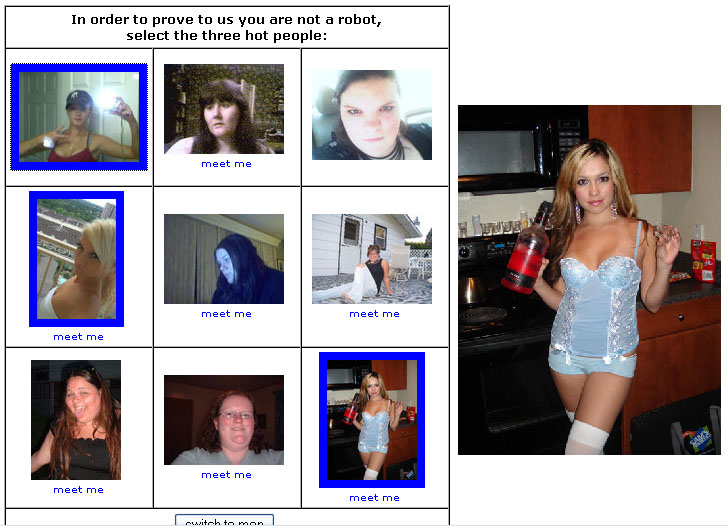
Hotcaptcha is a mash-up 'are you a human' test which uses photos from HotOrNot to determine if a user on the other end of the net is a human or a person. Here's a sample:

You can vote on just boyz, just girlz, or a mix of both.

It's really kind of a creepy experience... looking at 6 people who statistically rank as 3 or lower and 3 people who rank as 8 or higher. You don't normally see that kind of thing in a club in real life. I mean, you see ugly people all the time, (say, at Wal-Mart, or anywhere in Midwest America) but you don't normally find dispersed among them in a 1-to-3 ratio extremely hot people... and this is a good thing (for most people) because it creates the 'office pretty' effect and the 'sacred cow' phenomenon!

We've all felt the effects of the 'office pretty' person... that individual who is empirically, not that attractive, but when you place hir in a room with even less attractive people, over time, sie becomes more and more attractive. Given enough time in a job, a 5 can become a 9, in other words.

You can also see the 'sacred cow' effect when ordinary girls go to an engineering school dominated by boys. All of a sudden, with the lack of competition, they are magicially tranformed to the state of goddess. Their sense of entitlement is almost cute. I imagine this happens to boys in say, Elementary Education and Nursing courses too, though presumably both take place inside the larger liberal arts system where attractive boys can be found.

But I digress... anyway, to date, this is the most amusing (and at the same time, appalling) !Turing Test I've come across. What's a !Turing Test? Why, it's the opposite of a Turing Test, of course! What's a Turing Test? Put simply, it's a test imagined by Alan Turing in a paper he wrote in 1950 (you can read it here) which has come to be the foundation of the philosophy of artificial intelligence.

Because I'm too lazy to type this fresh, allow me to quote from the book of Wikipedia:

The test was inspired by a party game known as the "Imitation Game", in which a man and a woman go into separate rooms, and guests try to tell them apart by writing a series of questions and reading the typewritten answers sent back. In this game, both the man and the woman aim to convince the guests that they are the woman. Turing proposed a test employing the imitation game as follows: "We now ask the question, 'What will happen when a machine takes the part of A in this game?' Will the interrogator decide wrongly as often when the game is played like this as he does when the game is played between a man and a woman? These questions replace our original, 'Can machines think?'" (Turing 1950) Later in the paper he suggested an "equivalent" alternate formulation involving a judge conversing only with a computer and a man.

Turing originally proposed the test in order to replace the emotionally charged and (for him) meaningless question "Can machines think?" with a more well-defined one. The advantage of the new question, he said, was that it "drew a fairly sharp line between the physical and intellectual capacities of a man." (Turing 1950)

And thus, we see how the history of computing, artificial intelligence, and HotOrNot is linked to boys trying to pass as girls.

Now that we're up to speed, I'd like to suggest that the real question should be can the system of man+machine be considered to think? For this, the judge is your consciousness (pause on that for a moment)... the 'man' is your physical body, and the 'machine' is whatever you are interfacing with on the other side of your computer screen. Will your consciousness decide that the combination of your body plus machine be considered to think?

Once you grok this, you'll probably come to the same conclusion as Alan Turing, that the original quesitons of 'can machines think' is fairly meaningless, and misses the point entirely, kinda like this mashup of HotOrNot.

Friday, May 05, 2006

[HCI] Does not compute...

I was challenged today, by a computer, to prove that I was a human. Not challenged to confirm my identity, but instead challenged to show that I was merely a human.

We interact with dozens, perhaps hundreds of machines each day and yet most of us aren't even aware of our interactions with them other than a vague feeling of a program or device being "easy to use" or -- worse -- "impossible to understand." Truth is, there are a LOT of bad designs and interfaces out there, but ironcially, it's not the designer's fault! I know this because I teach these people to build better interfaces.

The designer is the person who ultimately is responsible for building the machine code which will interprate your interactions as input, and conversely, the machine's representation of data into something that is recognizable to your eyes and ears. That is to say, the designer handles all of the Human-Computer Interactions. Problem is ... those very people who are best apt to build such things are often more likely to see things from the computer's point of view ... rather than the Humans! It's the 21st century version of a greek tragedy.

The result of this are interfaces that make perfect sense to technophobes, yet remain uncomprehensible to the masses.

Occasionally however, even geeks can get stumped... Can you figure out what the middle character is?


Sometimes a computer needs to check there really is a human on the other end of the internet. The current vogue is for the computer to take some letters, distort them a bit, and ask the person (or another computer!) on the other end to TYPE them back. The computer knows what to expect, so if you get it wrong, it assumes you can't read and type and therefore, are not human.

To understand fully the reasons why this is easy for a human and complicated for a computer would involve a computer science course on computer vision, which would itself rely on a strong background in college-level mathematics and computer science; ie, "it's really complicated and not that interesting." Suffice it to say then, that for the moment, the ability to write such a program has not yet been found among the pool of eligible people who might profit from doing so. In other words, it's not a fool-proof test.

And sometimes, it's just foolish.